The UDISE Plus Student Module is an essential component of the Unified District Information System for Education Plus (UDISE+), introduced by the Ministry of Education, Government of India. It enables schools, headmasters, and district education authorities to efficiently manage and update student-level information digitally in real time across all states and Union Territories of India.
Udise Plus Student Module- Why It’s Important
With more than 1.49 million schools and 264 million students registered, the Student Module plays a key role by assigning every student a unique Permanent Education Number (PEN). This system helps track essential details such as:
- Enrollment and class promotions
- Student transfers and dropouts
- Daily attendance monitoring
- Eligibility for government schemes (mid-day meals, uniforms, scholarships, etc.)
Who Uses the Student Module?
The Udise Plus Student Module is primarily accessed by:
- Teachers and staff are responsible for class-level data entry
- School Headmasters (HMs)
- Cluster Resource Persons (CRPs)
- Block and District MIS Officers
- State-level education authorities
What You’ll Learn on This Page:
Step-by-step guidance to log in to your state’s SDMS dashboard
- Detailed explanation of GP (General Profile), EP (Enrollment Profile), and SF (Student Facilities) sections
- Common login problems and how to fix them
- Tips to ensure accurate and error-free DCF submissions
- Role-wise responsibilities and best practices for secure data access
What Is the UDISE Plus Student Module and Why Is It Important?
The UDISE Plus Student Module is India’s official platform for collecting, updating, verifying, and submitting student-level information for every recognized school in both rural and urban areas.
Integrated within the UDISE+ SDMS (Student Database Management System), this portal enables schools, headmasters, CRPs, and district MIS officers to manage real-time student records related to:
- Enrollment details
- Dropouts and student transfers
- Entitlements such as textbooks and mid-day meals
- Promotion and academic progression
- Caste, gender, and minority status
- Aadhaar-linked PEN (Permanent Education Number)
Key Objectives of the Udise Plus Student Module:
- Maintain Accurate Student Records: Each student receives a unique PEN, enabling centralized and easily searchable tracking.
- Strengthen Policy Planning: Verified data support NEP 2020, PGI evaluations, and RTE 12(1)(c) implementation.
- Enhance Transparency: Reduces manual duplication and minimizes data-entry errors through built-in audit trails.
- Enable Real-Time Progress Monitoring: Helps authorities take timely district-level and school-level actions related to infrastructure, dropout trends, and resource gaps.
Step-by-Step Login Guide for the UDISE+ Student Module (2025–26)
Follow These Steps to Access Your Udise Plus Student Module:
Open the Official UDISE+ Login Portal:
- Visit https://sdms.udiseplus.gov.in
- Or go through the main website https://udiseplus.gov.in
- Click on the “Login for All Modules” option located at the top-right corner.
Choose Your State/UT:
- Select your state or union territory from the dropdown menu.
- This directs you to the appropriate state-specific SDMS dashboard.
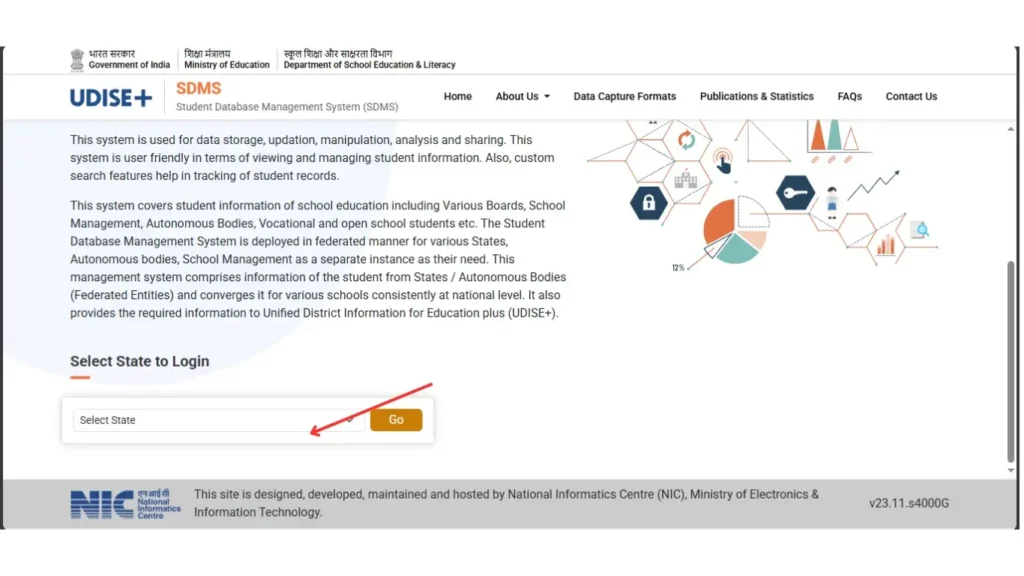
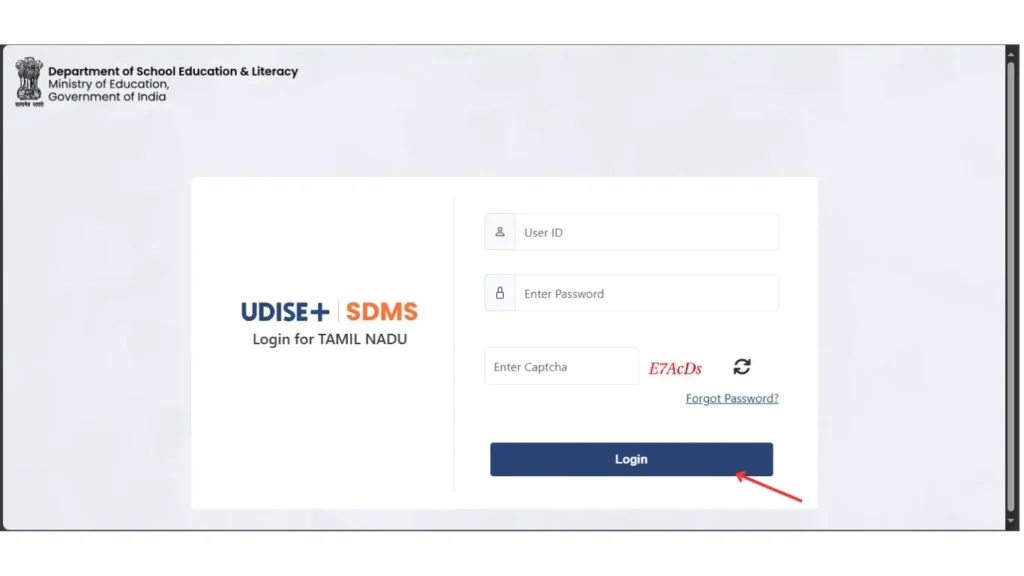
Enter Your Login Credentials:
- Username: Your 11-digit UDISE code
- Password: Issued by your Block MIS Coordinator or Headmaster
- Captcha: Enter the characters shown on the screen exactly as displayed (case-sensitive)
Access Your Dashboard & Module:
- Click Submit to log in
- The dashboard with various options will appear
- Choose Student Module (SDMS) to proceed
Begin Managing Student Records:
- GP: General Profile
- EP: Enrollment Profile
- SF: Schemes & Facilities
- Start updating details, saving changes, or reviewing existing submissions.
Log Out Safely After Completing Your Work:
- Always log out to prevent unauthorized access
- All submissions are linked to your user ID and automatically timestamped, making logout an essential security step
Credentials Tip:
| “If you are unsure of your UDISE code or password, reach out to your School Data Entry Operator, Headmaster, or Block MIS Coordinator.” |
They can assist with:
- Retrieving your username (UDISE Code)
- Resetting your password
- Verifying data during bulk Excel uploads
How to Use the UDISE Plus Student Module for the 2025–26 Academic Year
After logging in, schools can access the UDISE Plus Student Module Dashboard to manage and update student information, organized into three main data categories:
Core Profiles in Udise Plus Student Module
General Profile (GP): Includes student details such as name, date of birth, gender, Aadhaar number, mother tongue, and parents’ names.
Enrollment Profile (EP): Covers admission number, UDISE code, promotion or retention status, and class/section information.
School Facilities Mapping (SF): Tracks benefits received by the student, including mid-day meals, uniforms, free textbooks, and scholarships.
| Tip: Every field corresponds to the SDMS-aligned DCF (Data Capture Format) to ensure compliance with NEP 2020 data requirements. |
Key Tasks in the Udise Plus Student Module
Choose the Academic Year:
Make sure “2025–26” is selected before continuing. Matching the correct academic session is essential to prevent data synchronization errors.
Update Student Progression
Menu Path: Student Movement and Progression
- Select the relevant class and section
- Update each student’s status:
- Promoted
- Retained
- Transferred
- Dropped Out (monitored under the RTE Act)
For transfers, enter the new school’s UDISE code. The system will batch sync and update records after MIS approval.
Add New Students
Tool: “Add Student” button
- Complete the General, Enrollment, and Facility profiles
- Use PEN (Permanent Education Number) + Date of Birth to auto-fetch previous records, if available
- Bulk upload via Excel for multiple students
Verify and Submit:
- Utilize the built-in Auto Error Preview
- Key validations include:
- Missing mandatory fields
- Incorrect promotion status
- Invalid UDISE format
Once verified, lock the data for the academic year. Further changes can only be made by the Block or District MIS authorities.
FAQ
What is the UDISE Plus Student Module?
The UDISE Plus Student Module is a digital platform under UDISE+ that allows schools, headmasters, CRPs, and district MIS officers to manage, update, and verify student-level data in real time for all recognized schools across India.
Who can access and use the Student Module?
Teachers, school headmasters, Cluster Resource Persons (CRPs), Block and District MIS Officers, and state-level education officials can access the module to update student records, track enrollment, monitor promotions, and manage benefits.
How is student data secured in the UDISE Plus Student Module?
Each student is assigned a unique PEN (Permanent Education Number), and all updates are timestamped and linked to the user’s ID. Logging out after each session and system validations prevent unauthorized access and ensure data integrity.